PEPperwork · Florida PEP reimbursements, without the paperwork headache.
Bad receipt? We’ll help you fix it.
Upload your receipt, find what may be missing, and get a ready-to-send correction request.
Independent tool for Florida PEP families. Not affiliated with Step Up For Students or EMA.
Receipt Rescue, in 20 seconds
A receipt that is missing details doesn't have to be the end of the story. Here's the whole loop (fictional example):
The receipt
PUTT PARADISE MINI GOLF
Family fun package …… $54.00
▲ no date
▲ student admission not listed separatelyYour Fix Request
“Could you provide a revised itemized receipt showing the complete purchase date and the student admission as a separate line item? I am not requesting a refund — only corrected documentation.”The corrected receipt
PUTT PARADISE MINI GOLF
08/15/2026 · #4417
Adult admission ×2 …… $28.00
Student admission …… $12.00
Child admission ……… $14.00
✓ ready for your packet
You review every word and send it yourself. PEPperwork never contacts a business or the scholarship program for you.
How it works
1. Scan it
Photograph the receipt, upload a file, or type it in. It stays on your device.
2. Fix it
ReadyCheck shows what may be missing — and Receipt Rescue prepares a ready-to-send correction request when the business can fix it.
3. Prepare it
Download a clean, clearly named Ready Packet and upload it yourself in EMA.
Before and after
▲ Before — 3 things may need attention
- Purchase date missing from the receipt
- One family total — student portion not separated
- No proof-of-payment detail
✓ After — you resolved all 3 receipt issues
Corrected receipt received and swapped in. Your receipt is ready for packet preparation — with the original kept in your local records.
Fictional example. This checklist helps organize a reimbursement request but does not determine eligibility or guarantee approval.
What Receipt Rescue does
- Spots receipt problems using the program's own documentation themes — each with the source and guidance date.
- Lets you choose and reword exactly what to ask the business for.
- Finds a verified business contact when possible — only contacts that actually appear on official pages, never guessed addresses.
- Prepares a polite, editable message that asks for corrected documentation — never a refund.
- Opens your own email app or the business's contact form. You send it.
- Tracks the fix and swaps in the corrected receipt when it arrives.
PEPperwork Resolution Center
They sent the same bad receipt?
Paste the reply and see what still needs fixing. Reply Rescue prepares an editable follow-up — included with your first Receipt Rescue case.
Open Reply RescueReimbursement placed on hold?
Turn the notice into a clear checklist, EMA upload plan, and optional calendar reminder — not an email to Step Up unless your notice says so.
Open Hold RescueYour Ready Packet
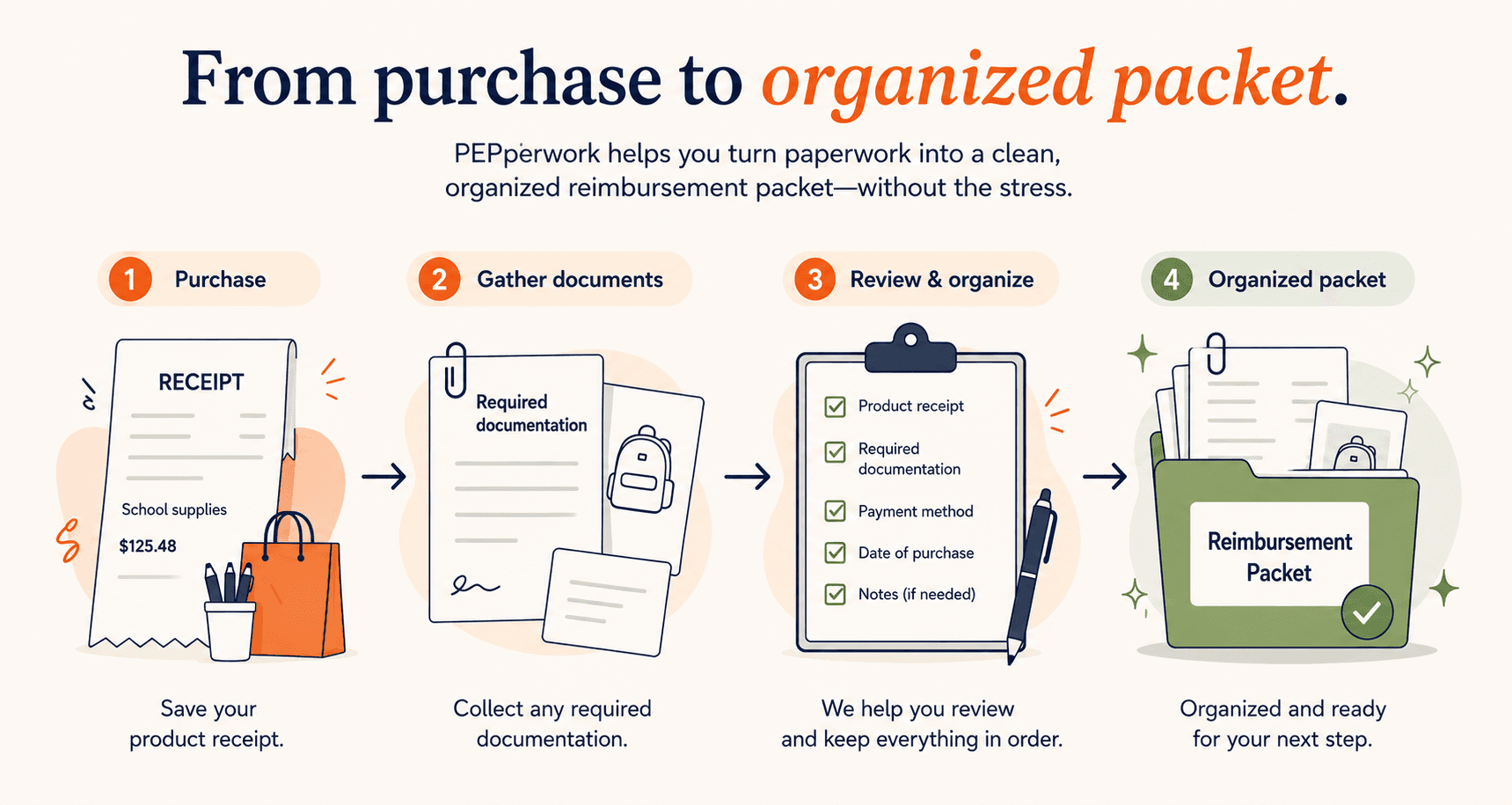
When the receipt is ready, PEPperwork prepares clean, clearly named files — receipt, proof of payment, an Educational Benefit draft when useful, and a submission summary — so the manual EMA upload is a five-minute task instead of an evening.
02-proof-of-payment.pdf
03-educational-benefit-form.pdf
reimbursement-submission-summary.pdf
- Photograph a receipt on your phone.
- ReadyCheck shows what may be missing or unclear — with the official source and date.
- Receipt Rescue prepares a polite, ready-to-send correction request for the business.
- Download a clean, clearly named Ready Packet for manual upload.
- Never enter EMA credentials into this product.
Simple pricing
Free
One complete ReadyCheck, one Receipt Rescue Fix Request, one full reimbursement preparation with clean downloads and an Educational Benefit draft when applicable. See the real result before paying anything.
Founding Family Pass $29 one-time
- • Unlimited ReadyChecks
- • Unlimited Receipt Rescue Fix Requests
- • Verified business contact lookup when configured
- • OCR assistance when available
- • Unlimited reimbursement preparation
- • ZIP and combined packet export
- • Reimbursement tracking
- • CSV export
- • Calendar export
- • Founding-access refinements defined in Terms
Private and independent
Your documents stay yours
Receipt images and reimbursement documents stay on your device (IndexedDB). Account email and paid entitlement status may be stored securely when you sign in. We do not store receipt images on our servers for this MVP.
You send everything
You review every correction request and send it from your own email. Contact lookup sends only the business name and location you confirm. Optional AI wording help sends only the message text, with your consent.
No guarantees — on purpose
This product is not affiliated with, approved by, or endorsed by Step Up For Students, EMA, the State of Florida, any scholarship-funding organization, bank, card issuer, or financial institution. This tool helps organize reimbursement documentation. It does not guarantee approval, determine final eligibility, submit requests, or provide legal, tax, accounting, or financial advice.
Frequently asked questions
- Does this submit to EMA?
- No. You prepare files here, then manually log in to EMA and upload them yourself. This product does not access EMA or collect EMA credentials.
- Is this affiliated with Step Up For Students?
- No. PEPperwork is an independent tool and is not affiliated with Step Up For Students, EMA, or the State of Florida.
- Does the tool guarantee reimbursement approval?
- No. Approval is determined solely by the scholarship-funding organization.
- What is Receipt Rescue?
- When a receipt looks incomplete, Receipt Rescue helps you decide what correction to ask the business for, prepares an editable Fix Request message, and helps you find an official contact route. You review and send everything yourself.
- Does Receipt Rescue email the business for me?
- No. It prepares the message and opens your own email app or the business's official contact form. You always review and send it yourself.
- Are my receipts stored on your servers?
- No. Receipt images and reimbursement documents stay on your device. If you create an account, only authentication and paid records are stored server-side.
- Can I use it on my phone?
- Yes. The main workflow is mobile-first and can use your phone camera where supported.
- Does it tell me whether an expense is eligible?
- No. It provides organizational guidance and links to official sources. It does not determine final eligibility.
- Why use this before submitting?
- To catch common documentation gaps, fix receipt problems with the business before the wait begins, and prepare clearly named files before you upload them manually.
- What if program requirements change?
- Guidance includes last-verified dates and official links. Always check the current handbook, purchasing guide, and policy changelog before submitting.